
This article explains how to enable/disable Apache graceful restart in plesk via the control panel and command line.
Follow the steps:
Through the control panel:
- Log in to the Plesk control panel.
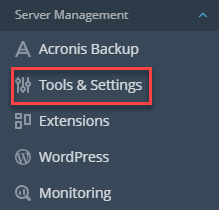
- Select the Tools & Settings option under the Server management category.
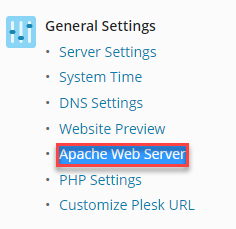
- You will enter a new page, locate the General Settings section, and click on the Apache Web Server option.
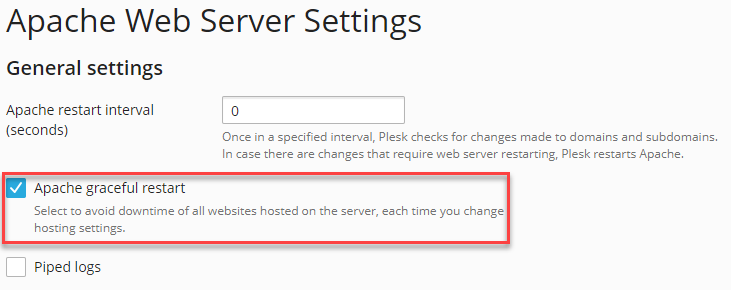
- Tick the checkbox named Apache graceful restart to enable Apache graceful restart, and untick it to disable.
Through the command-line interface:
- Connect to the Plesk server through SSH.
- Execute the below command:
- To enable Apache graceful restart-
# plesk bin settings --set restart_apache_gracefully=true
- To disable Apache graceful restart-
# plesk bin settings --set restart_apache_gracefully=false
- To enable Apache graceful restart-
Wasn’t it simple? If you liked our article, you will surely love our support. For any assistance, reach out to our support team.