
eukhost’s dedicated servers are designed for high performance and full management.
While our team continuously monitors the hardware and infrastructure, you can apply additional best practices within your server setup to ensure maximum speed, stability, and efficiency.
This guide outlines key configuration tips and cPanel/WHM-level optimisations to help you get the best performance from your eukhost Dedicated Server.
Table of Contents
Analyse Server Performance Metrics
Regularly monitor your server’s CPU, memory, and disk usage through WHM or SSH commands to identify performance blockages before making any changes.
Via WHM
- Log in to WHM > Server Status > Server Information to view CPU, memory, and disk usage.
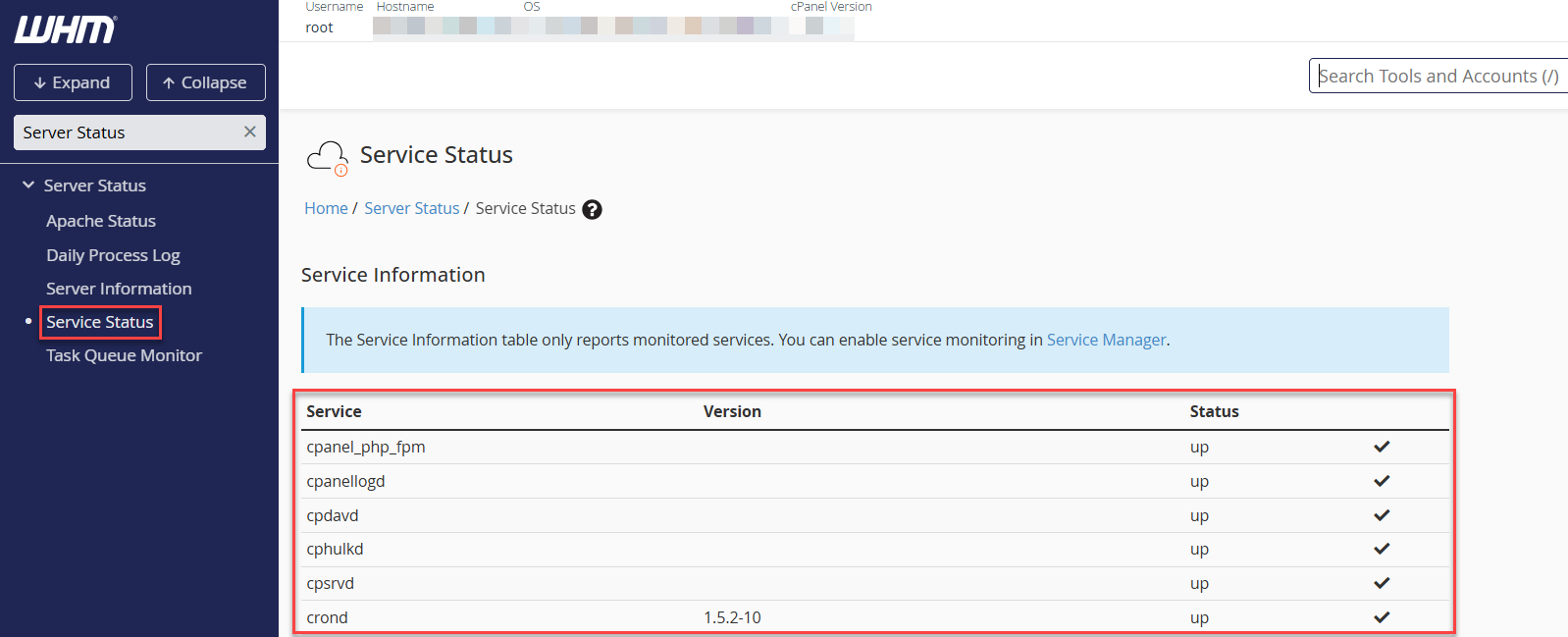
- Use WHM > Server Status > Daily Process Log to identify high-resource users or processes.
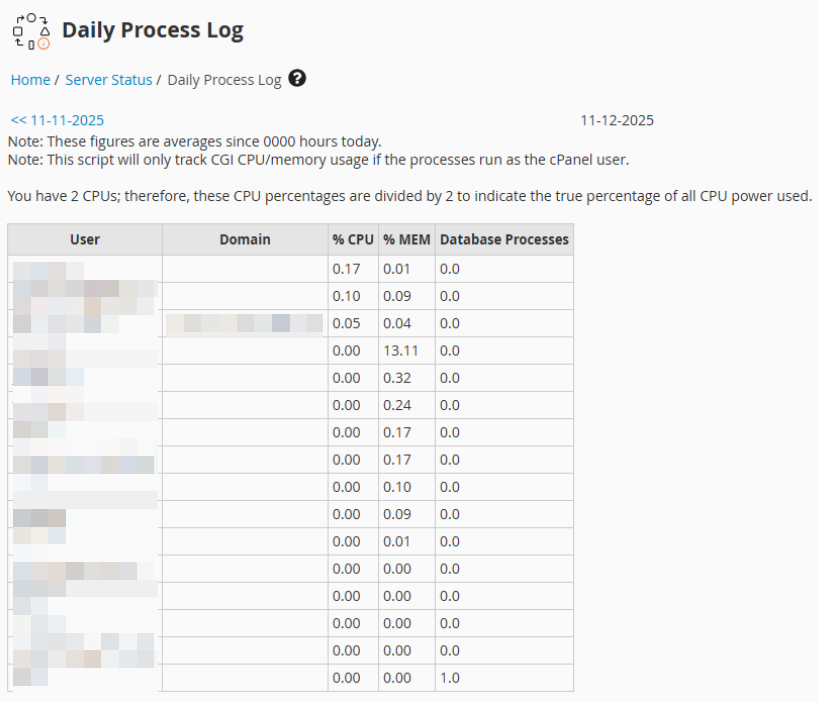
Via SSH (for root users):
If you have root access to your dedicated server, you can monitor performance directly through SSH using the following commands:
- top or htop: View real-time CPU, memory, and process usage to identify which applications are consuming the most resources.
- iostat: Check disk I/O performance and detect slow read/write operations that affect server speed.
- netstat -s: Display detailed network statistics to monitor packet transmission, errors, and overall network health.
Note:
iostat requires the sysstat package to be installed.
netstat requires the net-tools package, which is deprecated on newer OS versions.
These tools help you gain deeper insights into server performance beyond the control panel interface. Regular monitoring helps identify whether the issue lies in applications, databases, or resource allocation.
Optimise Apache and PHP Configuration
eukhost’s dedicated servers support both Apache and LiteSpeed Enterprise (optional).
Proper tuning can significantly improve response times.
Apache (via WHM):
To optimise Apache settings, log in to WHM and navigate to Service Configuration > Apache Configuration > Global Configuration.
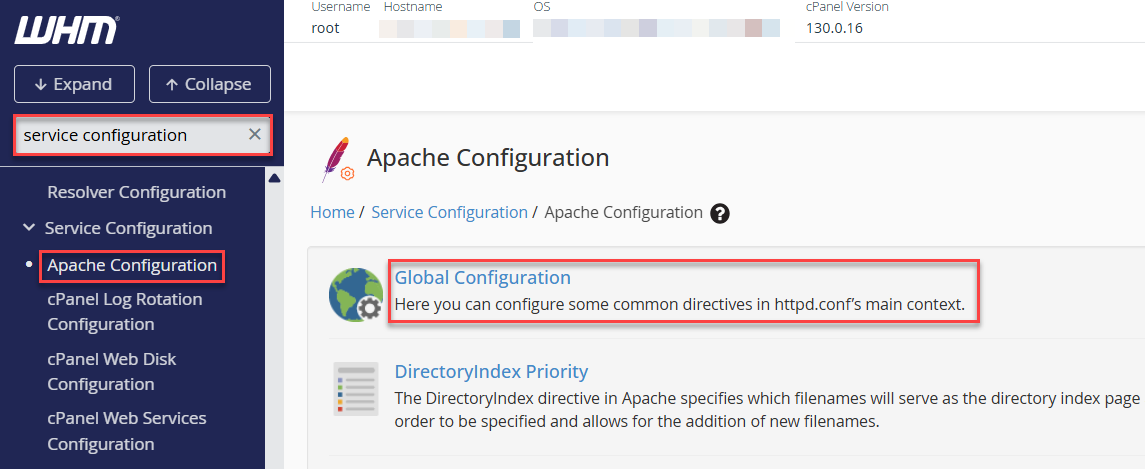
- Set the MPM to Event, which is recommended for efficiently handling high-traffic websites.
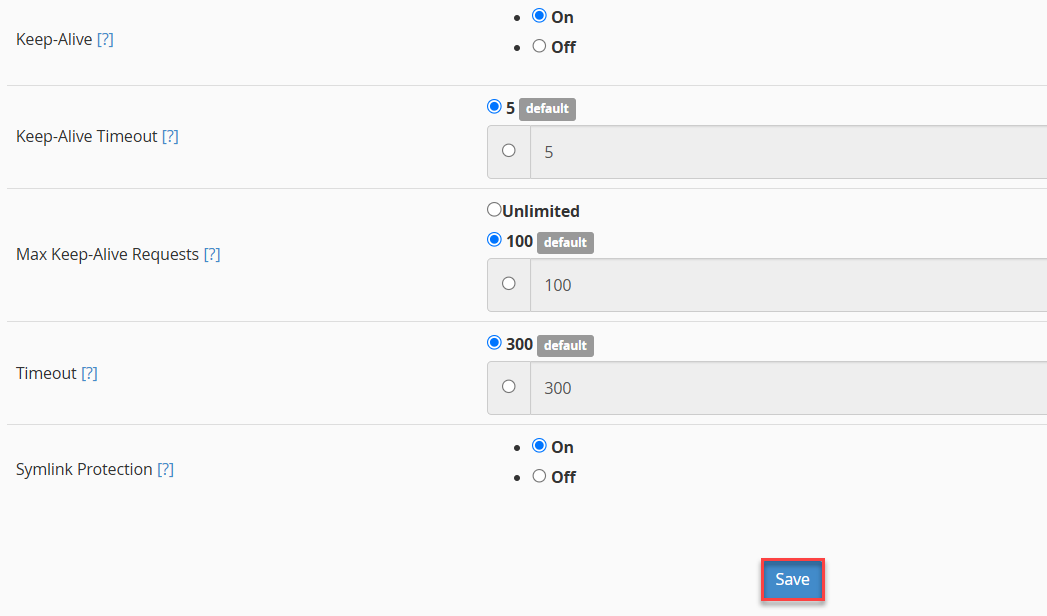
- Enable Keep-Alive and set the timeout to around 5–10 seconds to maintain persistent connections without overusing resources.
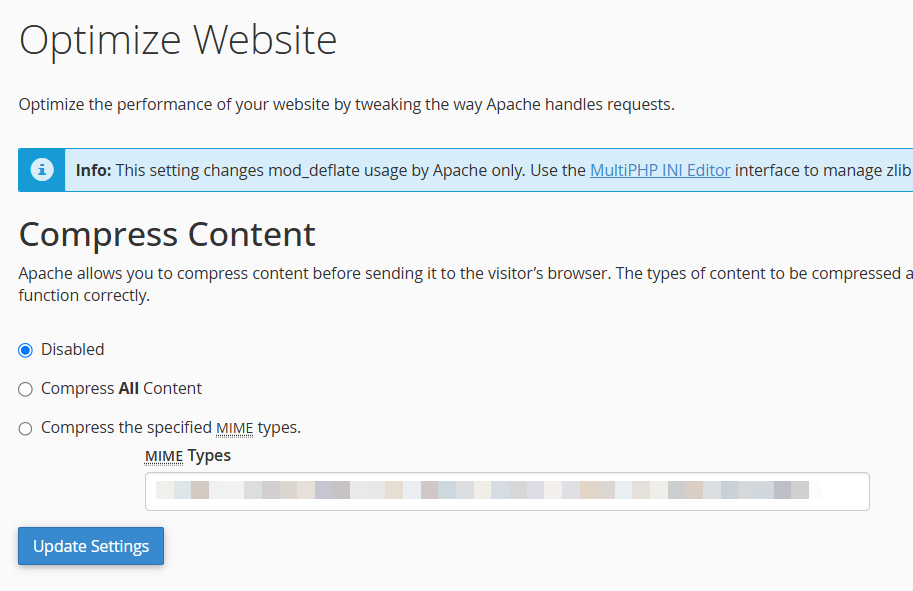
- Additionally, you can enable Gzip compression from cPanel > Optimise Website to reduce data transfer size and improve load speed.
PHP-FPM (via WHM):
For PHP performance, go to MultiPHP Manager in WHM and enable PHP-FPM for the desired domain(s).
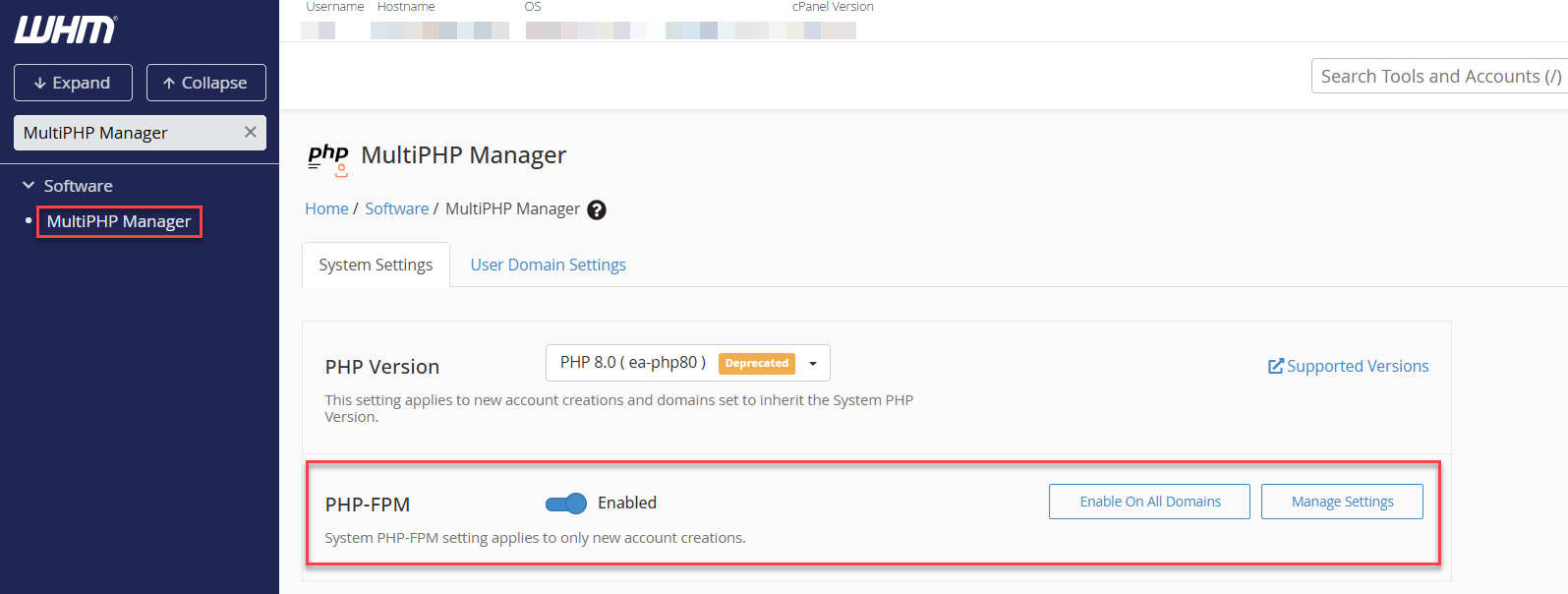
- Under Edit PHP-FPM Pool Options, set the process manager to ondemand and adjust pm.max_children based on your available server memory to balance load handling and resource usage.
- Enable OPcache to minimise PHP script compilation time and reduce server load.
For CMS-based websites such as WordPress, Joomla, or Drupal, it is also recommended to use caching plugins like LSCache or W3 Total Cache to further improve site speed and efficiency.
Database Optimisation (MySQL/MariaDB)
Databases can often become a performance bottleneck if they are not properly tuned. On eukhost dedicated servers, you can optimise MySQL or MariaDB via SSH or phpMyAdmin to improve query speed and overall responsiveness.
Best Practices:
- Adjust InnoDB buffer pool size:
Set innodb_buffer_pool_size to around 60–70% of available RAM on database-heavy servers to improve read/write efficiency.nano /etc/my.cnf innodb_buffer_pool_size = 4G
Note: The MySQL/MariaDB configuration file path may vary depending on your OS version. Some systems use /etc/my.cnf.d/server.cnf instead of /etc/my.cnf.
- Enable slow query logs to identify inefficient or long-running queries:
slow_query_log = 1
slow_query_log_file = /var/log/mysql-slow.log
long_query_time = 2
You can then review and optimise the queries that take longer than expected to execute.
- Clean up unused databases or tables to reduce overhead and free up resources.
- Limit remote database access to improve both speed and security; only allow trusted IPs to connect.
- Run regular maintenance tasks, such as:
mysqlcheck -o --all-databases
to optimise database tables and improve query performance.
Enable Caching and CDN
Caching and content delivery networks can dramatically improve load times.
- Server-Level:
- Enable OPcache and Memcached via WHM > Software > EasyApache 4 > PHP Extensions.
- Install Redis (available for managed servers upon request).
Note: Redis installation is handled by eukhost support and is available only on Managed Dedicated Servers.
- Application-Level:
- Use plugins like LiteSpeed Cache (for WordPress or Magento).
- Enable browser caching via .htaccess or Nginx configuration.
- CDN:
Storage and Disk Performance
eukhost’s dedicated servers use enterprise-grade SSD or NVMe storage.
To maintain peak I/O performance:
- Keep at least 20% free disk space.
- Use RAID 1 or RAID 10 for redundancy and speed (configured by Eukhost).
- Regularly check disk health via:
- smartctl -a /dev/sda
- Avoid oversized log files; clear old logs in /var/log periodically.
Security That Enhances Performance
Strong security also contributes to server stability. All eukhost-managed dedicated servers come with Imunify360 (optional), CSF Firewall, and cPanel Security Centre.
- Recommended:
- Restrict access to SSH and WHM by IP.
- Disable unused services and ports.
- Enable Fail2Ban for SSH brute-force protection.
Note: Fail2Ban requires SSH password authentication. If your server uses only key-based authentication, some jail rules may not trigger. - Keep cPanel, PHP, and OS packages updated.
- You can view or modify firewall rules via:
csf -l
csf -d IP_Address
Continuous Monitoring and Alerts
Continuous monitoring is essential to maintain server stability and prevent performance issues before they escalate. eukhost’s managed support team actively monitors key server metrics such as:
- CPU usage
- Memory spikes
- Disk performance and failures
- Network latency or downtime
For customer-side visibility and control:
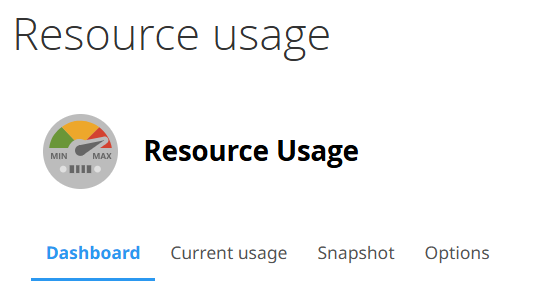
Access cPanel > Resource Usage to review account-level resource consumption and identify usage trends.
Implement monitoring tools like Netdata, Zabbix, or Munin to receive real-time alerts for CPU, RAM, or disk anomalies.
If you observe persistent high load, abnormal processes, or frequent slowdowns, reach out to our technical support team for further investigation and performance optimisation assistance.
Regular Updates and Maintenance
eukhost applies security patches at the OS level for managed servers.
However, customers should:
- Keep CMS platforms (WordPress, Joomla, etc.) updated.
- Regularly update plugins and themes.
- Run yum update (CentOS) or apt upgrade (Ubuntu) for self-managed servers.
Scheduled maintenance prevents slowdowns caused by outdated software or dependency conflicts.
Performance tuning on a dedicated server involves a combination of proactive monitoring, correct configuration, and timely maintenance.
At eukhost, our Managed Dedicated Servers include expert assistance for performance optimisation, monitoring, and troubleshooting to ensure consistent uptime and reliability.
If you require advanced optimisation support, contact our 24×7 Technical Support Team through your client area.
Want to monitor your server’s performance proactively? Learn How to Set Up Proactive Monitoring for Your Dedicated Server