
NGINX is a high-performance web server and reverse proxy used to serve websites efficiently. This guide explains how to start, stop, or restart NGINX services on a cPanel server using the recommended methods.
Steps to run NGINX services in WHM:
Using WHM
The safest method to restart NGINX in a cPanel environment is via WHM:
- Log in to WHM as the root user.
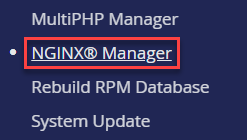
- Navigate to NGINX® Manager.
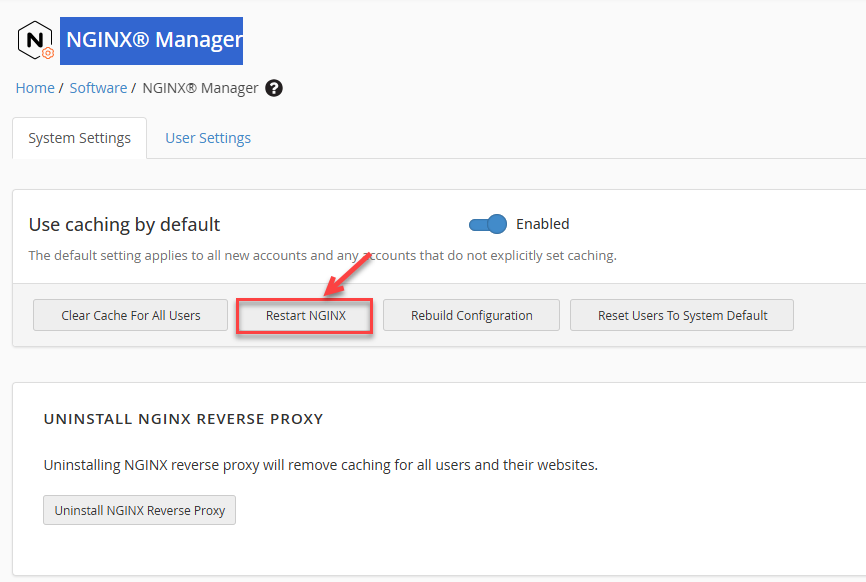
- Click Restart NGINX to safely restart the service.
Using the cPanel Restart Script
cPanel provides a built-in script for managing services. This script is stored under /usr/local/cpanel/scripts and ensures proper integration with cPanel:
/usr/local/cpanel/scripts/restartsrv_nginx
Recommended for most cPanel servers as it handles service dependencies properly.
Using System-Level Commands (OS / systemd)
You can also manage NGINX directly at the OS level using systemctl. This method works independently of cPanel:
systemctl start nginx
systemctl stop nginx
systemctl restart nginx
By following these methods, you can safely manage NGINX services on your cPanel server. For the latest updates and additional server management guides, visit our website regularly.